TABLE OF CONTENTS
TABLE OF CONTENTS
- 1. The limit of Team members
- 2. The 'Pending invitation' label disappears quickly and reverts to the 'No access' label

When you are trying to add someone to your project with Admin or Researcher access it doesn’t work. This could be due to:
1. The limit of Team members
Every subscription has its project members limit. For free accounts, it is always three members.
For Team subscriptions, it is usually fifteen members.
For Enterprise subscriptions, the numbers are flexible and depend on the agreement.
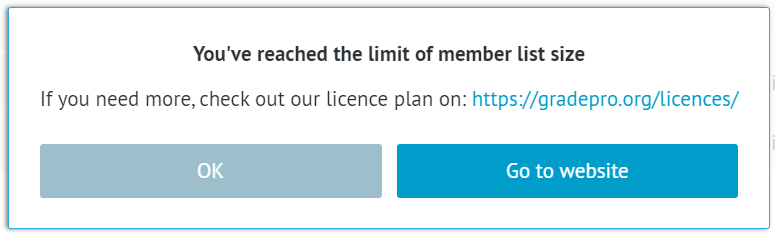
If a free account user tries to add more than three total users to their project, they will see a notification that they exceeded the limit.
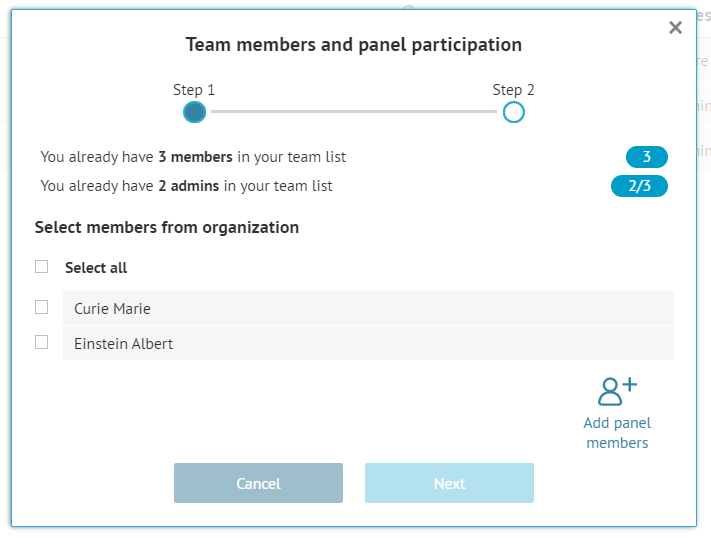
If a Team or Enterprise subscription user tries to add more than the allowed number of users, the adding option will be inactive.
2. The 'Pending invitation' label disappears quickly and reverts to the 'No access' label
This applies only if you are a Team or Enterprise subscription user.
You can add any person to your project as a Panel Member, whether or not they have a GRADEpro account and whether or not they are a member of your workspace.
However, if you want to change their access level (by design, Panel Members are added with No access rights) to Admin or Researcher (you can read more about access rights here), then this person must have a GRADEpro account and be added first to your organisation workspace. If they are not a member of your organisation workspace, when you try to invite them with Admin/Researcher access, the invitation will quickly disappear and go back to No access.
To add someone to your organisation workspace, you need to contact your project coordinator or the GRADEpro Support Team at support@evidenceprime.com
RELATED ARTICLES
Was this article helpful?
That’s Great!
Thank you for your feedback
Sorry! We couldn't be helpful
Thank you for your feedback
Feedback sent
We appreciate your effort and will try to fix the article